Rig Monitoring & Control
with Icom RS-BA1 Remote Program
Icom RS-BA1 software makes it possible to monitor and control Icom transceivers either locally or remotely. This article is for vision-impaired amateur radio operators who want to use RS-BA1 to display the settings of an Icom HF transceiver on a computer screen for improved visibility.
The basics of rig monitoring are described in a separate article using Ham Radio Deluxe in the examples.
Using RS-BA1 with a screen reader is described in another article.
Software
The RS-BA1 software runs on Windows XP(SP3), Vista, and Windows 7 systems. It consists of two programs—Remote Control and Remote Utility—each with an icon on the Desktop.
When the control computer is connected directly to the radio, only the Remote Control program is required. The Remote Utility handles remote communication over the Internet. In that case, a second computer (server) is located at the transceiver. (A base station server is not required for an IC-7700 with firmware version 2.0 or later.)
The Instruction Manual explains how to set up the serial connections for both programs.
The list of supported radios is as follows: IC-746, 746PRO, 756PROII/III, 7000, 7100, 7200, 7400, 7600, 7700, 7800, and 9100. There are also general sets of controls in the program that might work with older Icom radios.
Icom America loaned the RS-BA1 software for this review.
Connecting the Radio to a Computer
All supported radios have a CI-V remote control jack for the serial connection to a computer. Newer radios in the list also have either an RS-232 jack or a USB connector to use instead of the CI-V jack.
A TTL level converter is required for a CI-V connection. For this article, the level converter (Radio port) in a MicroHam USB Interface III was used to connect the transceiver CI-V jack to a USB port on my computer.
I also tried a less expensive serial-USB adapter with a Prolific Technology chip. The RS-BA1 Remote program worked with the adapter, but the direct CI-V connection to the radio failed intermittently. Serial adapters with FTDI chipsets are reportedly much more reliable.
RS-BA1 User Interface
The graphical user interface for the Remote Control Program is shown in Figure 1.
Figure 1. RS-BA1 graphical user interface for an Icom 746PRO.
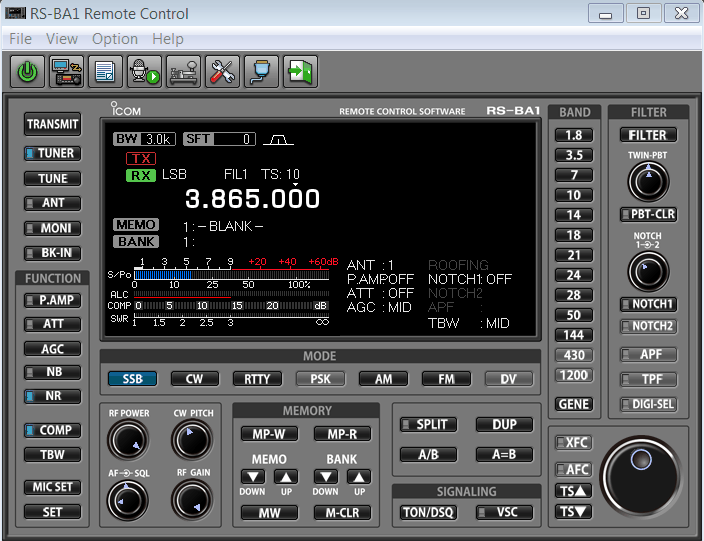

Left/right mouse click on a knob to turn it counter-clockwise or clockwise, respectively.
The radio panel window is 6.0" H x 7.8" W on a typical 22" display. The size is not adjustable, and it is not affected by the screen dpi setting. Labels on the buttons are 0.1" high.
RS-BA1 works well with the Windows screen magnifier utility.
Radio Menu Settings
Some radio menu items can be set using RS-BA1 menus. For example, the View→Set Mode menu can be used to configure the Notch Filter and Meter Peak Hold settings. Selecting each item in the View→Operating Panels menu opens a small sub-screen with controls, such as the Noise Reduction level, Filter options, and CW Keyer settings. Many of these sub-screens are also accessible by right-clicking buttons in the graphical radio panel.
User-Defined Keyboard Shortcuts
The Operations→Shortcut menu lets you assign hot keys that operate controls on the panel. For example, default shortcut keys enable you to (1) enter the operating frequency using the number pad on the computer keyboard and (2) toggle between VFO A and B using the space-bar.
Programming Memory Channels
The program can also be used to create or edit memory channel data and save it in the computer. These channel memories are accessible only with the program. The Remote Controller can not read from the radio memory or write to it.
Rig Monitoring
The data screen on the control panel (Figure 2) has a lot of useful information besides the operating frequency.
Figure 2. RS-BA1 data screen for an IC-746PRO.
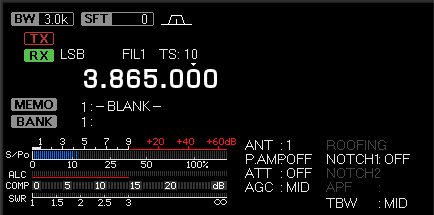

All of the multi-meter readings—S-meter, power, ALC, COMP, and SWR—are shown on the data screen. The Icom graphical multi-meter is compared with the Ham Radio Deluxe and Kenwood ARCP meters in a separate article.
Some buttons have a simulated status light (Figure 3)—an area that turns light blue when the function is on.
Figure 3. RS-BA1 status light shows Noise Reduction is ON.


A YouTube video by Simon Lewis, ZL4PLM, demonstrates the program.
Summary
The RS-BA1 Remote Control Program can be used to monitor an Icom HF transceiver using a computer display for improved visibility. All multi-meter readings (power, SWR, etc.) are shown on the screen. Some radio menu items are also accessible. You can create and edit memory channels that are stored in computer memory.
Acknowledgment
Thanks to Diane Morrison, KE7PCS, of Icom America, Inc. for loaning the software, and to Chris Zenchenko, WN9RSQ, for helpful information.
Author Information
Peter DeNeef, AE7PD, is an Extra Class amateur radio operator in the USA. This website has no ads or conflicts of interest.
Email: HamRadioAndVision "at" gmail "dot" com.
rev. 3/18/2015
Related Articles: Rig Monitoring Basics
Monitoring an Icom Multi-Meter
Magnification of Ham Radio Programs